

IT Ticketing
Compucom | 2022
Research + Strategy
Data Analytics
UX / UI Design
Compucom is an IT services provider.
When working on our new chat feature, we analyzed 1489 chat transcripts and found that 19% of chats were users asking about already opened tickets.
As time went on, this statistic kept nagging at me. I wanted to investigate –Why were our users left with so many questions about their tickets?

THE PROBLEM

PRIMARY RESEARCH
-
Interviews | Understanding our user's current pain points with the ticketing experience.
-
Journey Mapping | Translating our user's experiences into cohesive journeys.
-
Reading Old Chat Transcripts | Manually reading + categorizing transcripts to understand user's common questions + needs.
SECONDARY RESEARCH
-
Data Analytics | Working with our current data systems to pull informational stats.
-
Benchmarking | Seeing how other companies are doing the same process.
SECONDARY RESEARCH
Data Analytics


PRIMARY RESEARCH
Journey Mapping
We spoke to 4 users about their current experience with our ticketing system. Analyzing insights from those interviews, we were able to break down the ticketing experience into 5 steps. Below are their pain points during each step of the journey.

RESEARCH SYNTHESIS
Major Insights
01
Our users get too many emails and don’t feel they have necessary information.
02
Our users do not trust our process and have no clue what is going on with their tickets.
03
Our users are missing contacts from us because we are random + inconsistent in our approaches.

THE CURRENT EXPERIENCE
Emails + Ticket Details
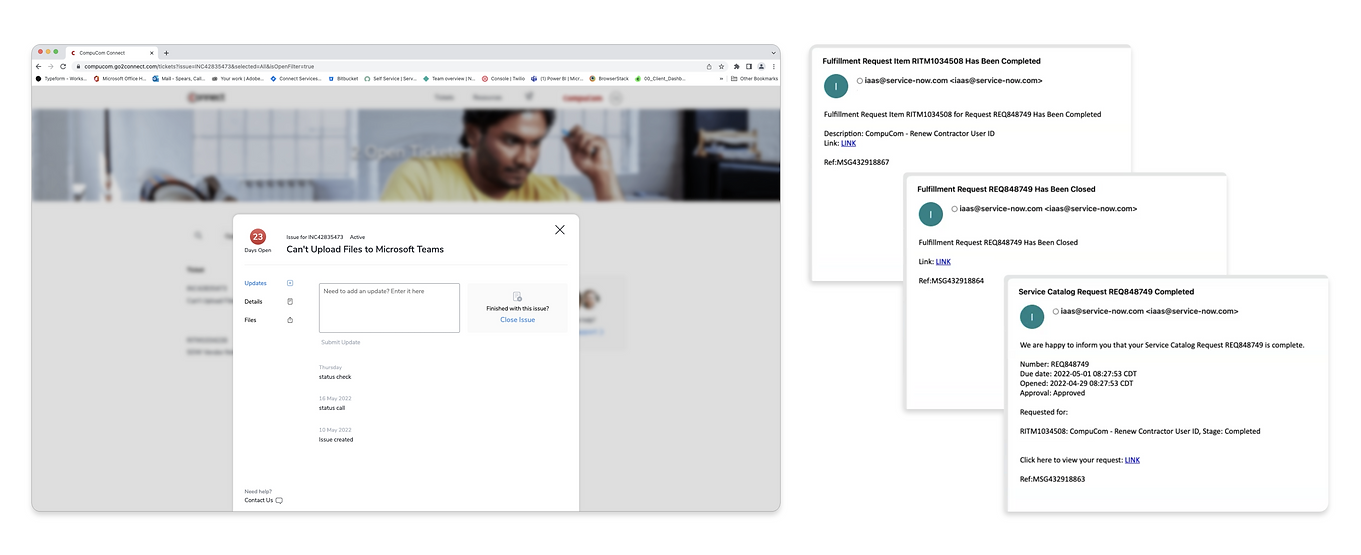
Our current ticketing emails have been lovingly called "ransom notes" by some of our users. They have no hierarchy, little to no accessible information, and lack any sort of enjoyment.
Although our current ticket details fare better, they lack consistent updates or ways to contact the agent working the ticket.
TESTING + RETESTING
Ticket Status Surveys
In an effort to improve clarity, we looked at the statuses we had attached to our issues + requests. We sent out surveys to our users asking them to define what they thought the statuses meant (original status results = light blue).
Once understanding the initial comprehension, we spoke with our stakeholders and determined which statuses were necessary for our users to see. Then, we decided with statuses to retire and which desperately needed a name change.
We re-tested our new statuses for comprehension (new status results = green).


ISSUE STATUSES

REQUEST STATUSES
PRESENTING OUR FINDINGS
Monthly Showcases
We presented our research findings to all stakeholders on the project. Through this, we were able to learn even more about why certain tickets got lost in the system or had weird statuses from a backend perspective. This helped us collaborate on new solutions together.

FINAL PRODUCT
Ticketing Emails

All in all, we wrote new statuses, redesigned ticket detail pages, and coded new emails to create a better overall experience for our users.

FINAL PRODUCT
Ticket Details Page
Ability to directly message the agent working on the ticket

Eye-catching and easy to understand status updates
Update feed with transparent updates and clear messaging
Precise timeline to know what to expect and where you in the process

Added ability to send reminder emails to approvers
See the state of each approval and who you are waiting on
